![logo-7.png]](https://help.thinkreliability.com/hs-fs/hubfs/logo-7.png?height=50&name=logo-7.png)
While most of the workshop process will resemble the in-person workshop process described on this article, ThinkReliability instructors are required to have a work permit issued by the Canadian government to travel to Canada and deliver a Cause Mapping workshop. There are a few things that we will need from your company to obtain this permit.
Please send the following information to your workshop coordinator no later than three weeks before the start date of the training to give us the time to complete the work permit package on our end:
- Screen capture of online offer of employment number
- Offer of employment payment receipt
- Letter of invitation
Online Offer of Employment - Employer Portal
- A copy of our instructor's passport. The workshop coordinator assigned to your training will send this to you by email. If you have not received this, or cannot find it in your email, please send us a note at info@thinkreliability.com and we will send you a copy promptly.
- The proper NOC Code. Please use NOC Code 1112 - Professional occupations in business management consulting.
- Our instructor's job title. The job title to use is "Management Consultant."
- The LMIA exemption for the work performed. Please select, "CUSMA Professional - T36." When asked how the employee meets this exemption requirement, copy and paste the following: The employee is an American citizen and will be acting as a management consultant, under the North American Free Trade Agreement.
- Compensation details. Under compensation select "alternate compensation scheme," and explain that your company will be paying ThinkReliaiblity, and ThinkReliability will be paying the instructor delivering training to your employees. As a dollar amount, the value of the agreement between the companies may be indicated. Please use the value listed on your quote confirmation. If you need assistance finding that information, please don't hesitate to reach out to your workshop coordinator.
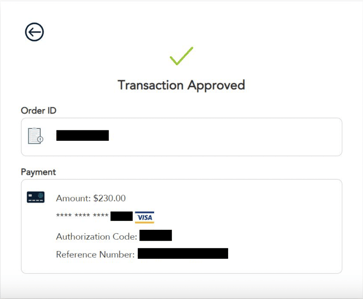
- Payment for job offer submission. The submission of the job offer is 230 CAD and is required at the time of offer submission. It is incredibly important that the payment receipt is printed at the time of payment. A copy of this receipt is not accessible after navigating away from when payment is made and is required for us to complete the work permit application.
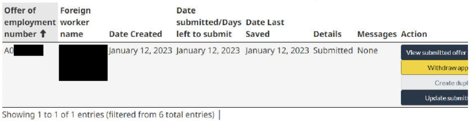
A screenshot of the employer page showing the offer of employment number should also be taken and shared with our team.
Letter of Invitation
As a final piece of our work permit package, we need a letter of invitation from your company for our instructor. Please use the steps below.
Complete the Letter
Download, review and complete this letter of invitation. The following information will be provided by your workshop coordinator or your quote confirmation:
-
- ARRIVAL DATE - Our instructor's arrival date
- DEPARTURE DATE - Our instructor's departure date
- INSTRUCTOR - Our instructor's name
- The year our instructor started with ThinkReliability
- Our instructor's education details
To make it convenient for you, we have designed the document in Microsoft Word to allow for easy utilization of the 'find and replace' function. This means that you can easily replace the ALL CAPS fields mentioned multiple times throughout the document with the relevant information. The yellow highlighted items in the document pertain to ThinkReliability and our instructor, while the blue highlighted items are specific to your company and contact details.
Print the Letter
Print the letter of invitation on your company's letterhead.
Return the Letter
Sign, scan and email the letter back to your workshop coordinator.