![logo-7.png]](https://help.thinkreliability.com/hs-fs/hubfs/logo-7.png?height=50&name=logo-7.png)
Activity Panel
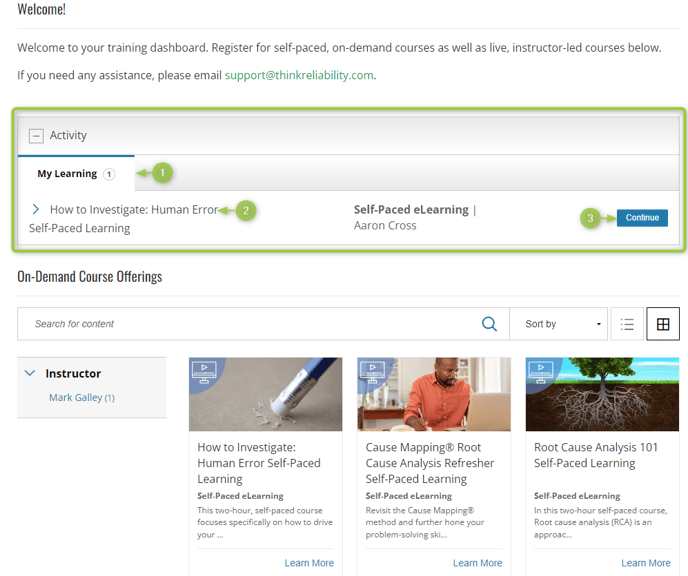
Once you have enrolled in a course, the Activity panel will display above the catalog listing. Depending on the types of courses and your course progress, you may have more than one section in the activity panel.
- Different tabs for various course types in which you have enrolled will be visible (i.e. My Learning for self-paced courses or Events for live courses, etc.).
- Titles for the courses are displayed. Click the arrow next to the title for expanded details. See the Expanded Activity View section below for more details.
- Depending on your progress within the course or learning path, you may see a Continue button or other button action related to the content. You might also see a link for rescheduling below this button if that option is available for your enrollment.
Expanded Activity View
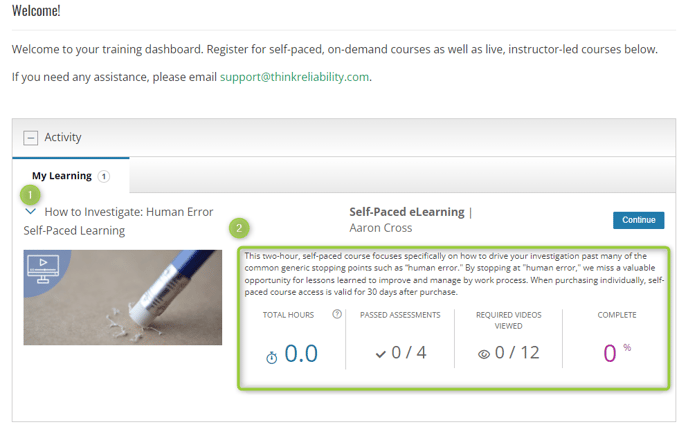
The expanded activity view provides additional metrics for your progress.
- Click the arrow next to the title to open the expanded view.
- The expanded view provides access to time spent within the course, the completion percentage, and other details to indicate course completion progress.