![logo-7.png]](https://help.thinkreliability.com/hs-fs/hubfs/logo-7.png?height=50&name=logo-7.png)
The learner dashboard provides access to the training catalog and activity tracking for any offerings that you have access to.
Banner images and text depicted in the screenshots below might vary depending on the type of access you have.
Initial Dashboard Overview
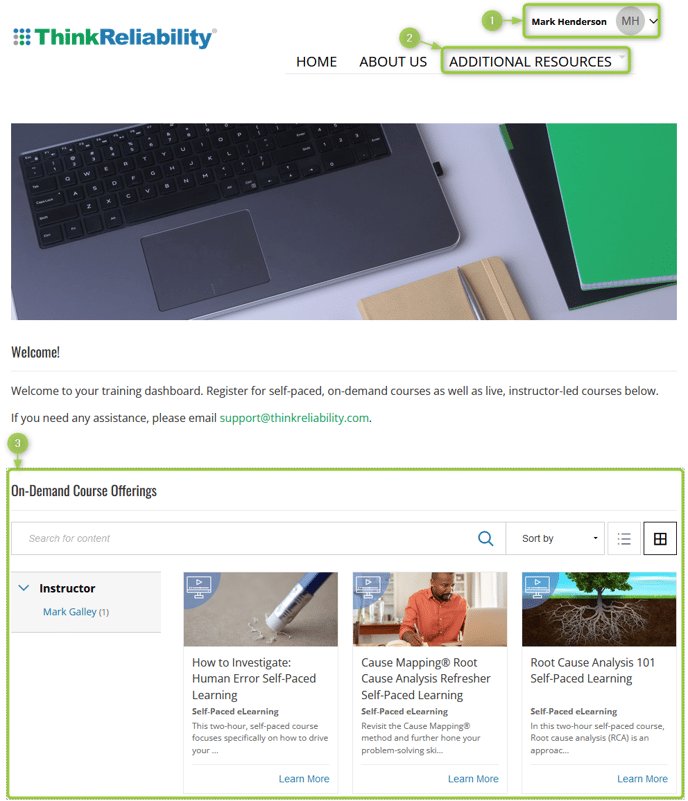
When you first enter the dashboard, three primary navigation areas are available:
- Click the chevron (down arrow) next to your initials to open the profile menu and access your profile, account details, transcript, and sign out.
- Additional Resources in the top navigation also provide access to your profile and transcript.
- The main area below the banner image provides access to the offerings available in the catalog.
Depending on your access, when you click on an offering in the catalog, you will either enter the course or be presented with additional options for access/purchase if necessary.
Find Your Course or Event Using the Activity Widget