![logo-7.png]](https://help.thinkreliability.com/hs-fs/hubfs/logo-7.png?height=50&name=logo-7.png)
While some course navigation elements may vary slightly, the general navigation of the courses is divided into sections, lessons, pages within lessons, and additional information sections.
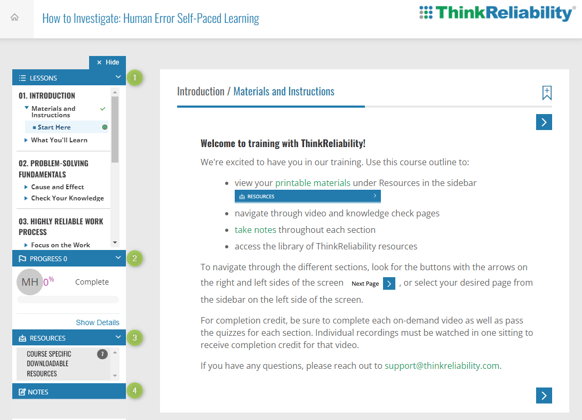
The screenshot in the example below contains:
- Lessons - This is where the bulk of the instruction and training information will live. Note that the first section or lesson is generally an introduction with details for course flow and navigation.
- Progress - This feature will show learners the percentage of the course they have completed so far.
- Resources - This will include any additional training materials for you to reference or download.
- Notes - This section allows you to write and save your own thoughts and takeaways while completing the course
The video below also shows how to navigate using the course arrows and course outline.